Snap the receipt. Dora books it.
Receipts, supplier invoices, bills or your card statement: Dora reads the file, splits out the amounts and suggests a category for each expense. You check it and save.
Card required for the trial · Cancel anytime · From $39/month
Payee
Aurora Serviços
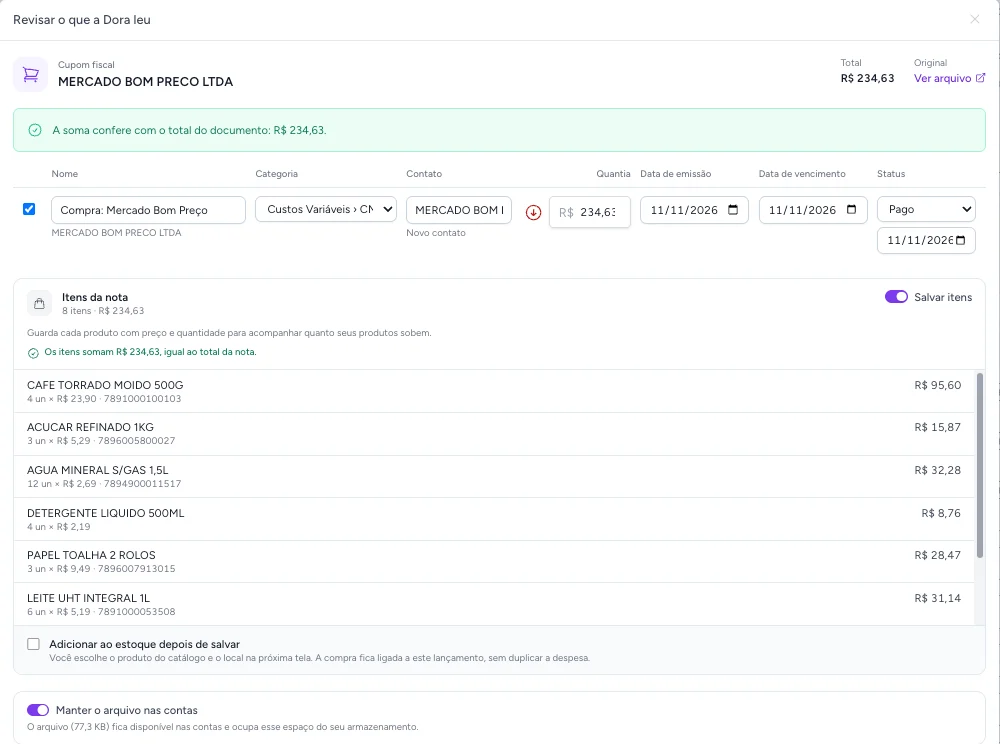
A receipt Dora read in a demo account.
- Document
- Receipt
- Credits
- 1 credit
- Review
- By you
- File
- Photo/PDF
RECEIPT · REVIEW · EXPENSE · P&L
What Dora reads.
Up to 10 files at once, as photos or PDFs. Each one becomes one or more expenses, ready to review.
Document
What it becomes
Credits
-
Store receipt
A paid expense, with each product, quantity and price.
Credits1
-
Supplier invoice
A bill to pay with the supplier and the due date.
Credits1
-
Card statement
One expense per purchase, each in its own category.
Credits3
Your statement becomes expenses. Nothing counted twice.
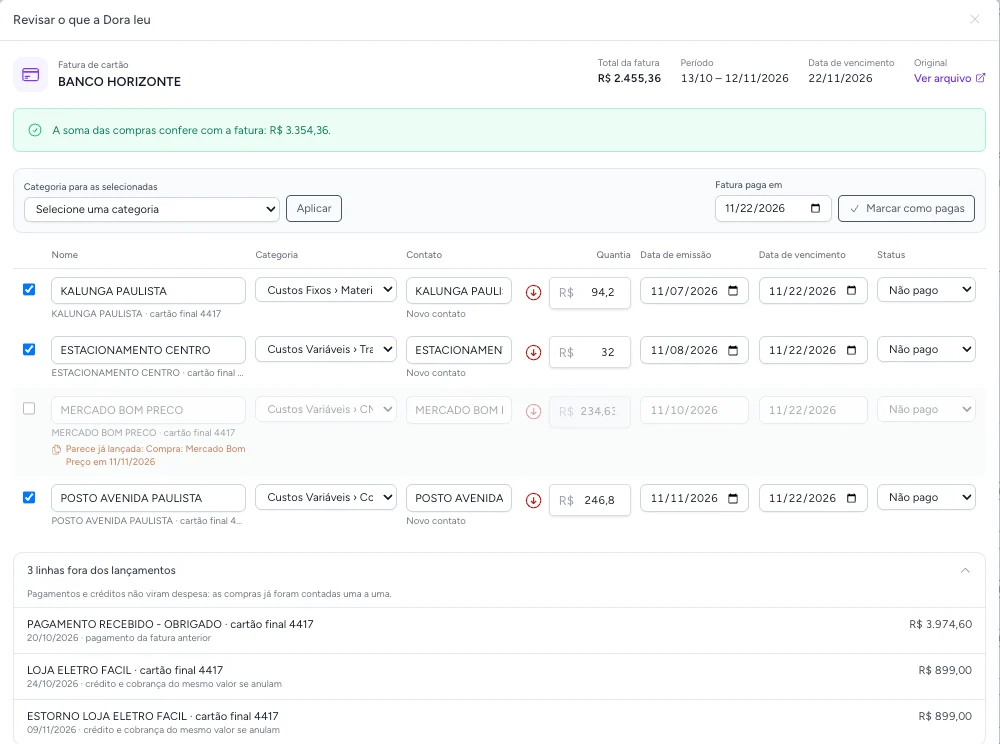
A statement mixes purchases, payments and refunds. Dora sorts each one out before you save.
- The statement payment stays out
- The "payment received" for last month's bill is not booked as an expense again.
- Refunds cancel the purchase
- A purchase and its refund cancel out instead of becoming two lines.
- What you already booked is flagged
- A purchase that came in from its receipt shows up flagged as a repeat.
At the end, the expenses are checked against the statement's purchases total.
Your inflation, not the average.
The official index tracks an average household's basket. With your receipts read, you see the price of what your business actually buys.
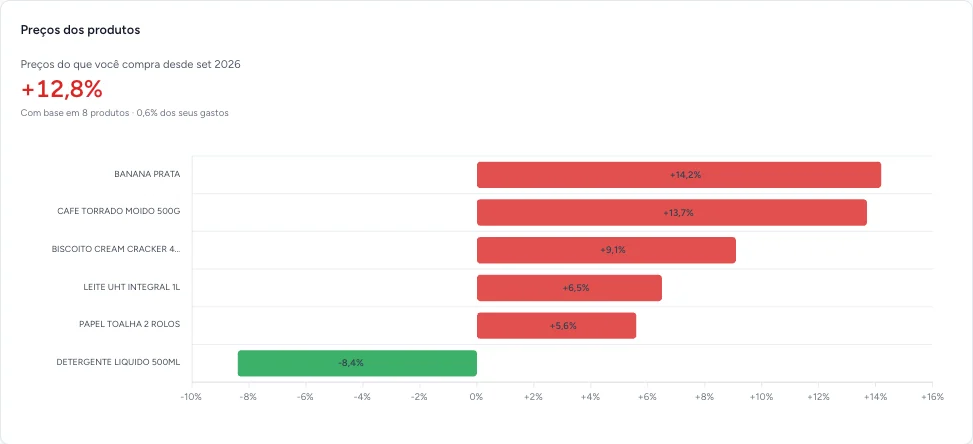
- Same product, same unit: a price per kilo is never compared with a price per item.
- Each month is compared with the last purchase of the same product, so a one-off promotion is diluted.
- From the second receipt on, each line shows how much its price moved since the last purchase.
Receipt items can also go into your stock.
Demo data: fictitious company and amounts
From receipt to P&L.
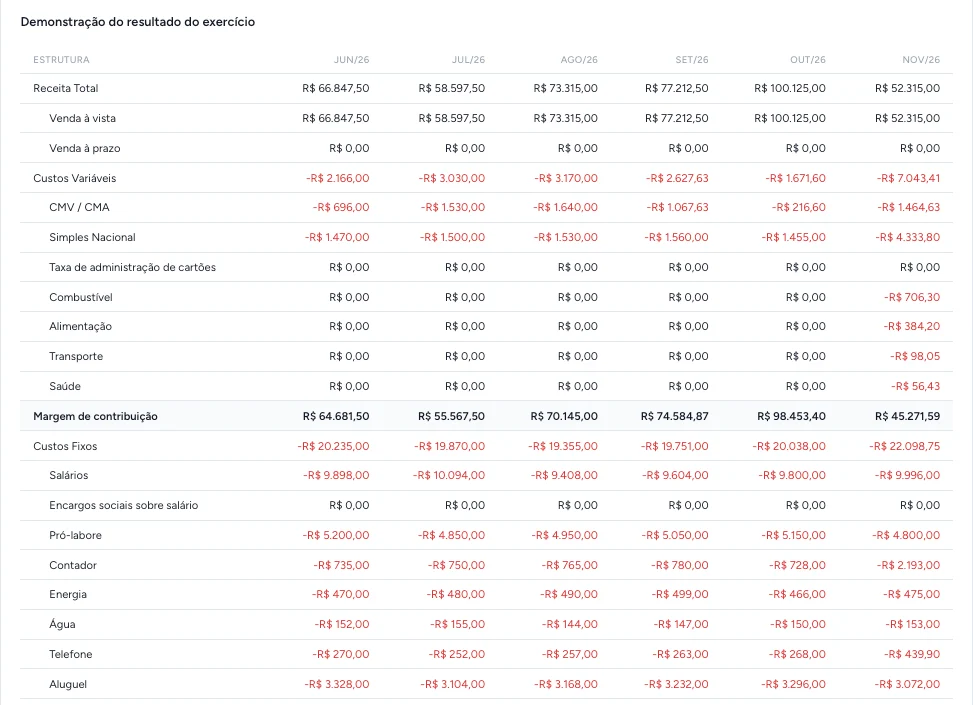
Every booked expense lands in a category. The income statement adds up revenue, costs and expenses month by month, with the subtotals you define, and downloads to Excel.
Your documents stay yours.
Reading
The file is read only to fill in your expenses.
AI training
Your documents are not used to train AI models.
Unconfirmed
Anything you do not confirm is deleted within 30 days.
File
You choose whether the file stays on the expense or is deleted once saved.
What it costs.
Reading uses the Dora credits your plan already includes every month.
Plans with expenses and P&L
- Profissional · $39 /mo
- Empresa · $89 /mo
- Receipt, invoice or bill
- 1 credit
- Card statement
- 3 credits
- A failed read gives the credit back
- Yes
Questions.
Does Dora save expenses on her own?
No. She prepares a draft with amounts, dates and categories, and nothing is saved until you review and confirm it.
Which files can I send?
A photo or PDF of a receipt, a supplier invoice, a bill or a card statement. Up to 10 files at once, up to 10 MB each.
How many credits does a read use?
Each document uses 1 credit, and each card statement uses 3 credits. A short statement of up to 2 pages costs the same as a document. If a read fails, the credit comes back.
What if I send the receipt and then the card statement?
A statement purchase that matches an expense already booked, by amount and date, shows up flagged as a repeat and you decide whether it goes in. The same file sent twice is not read or charged again.
Are my documents used to train AI?
No. The file is read only to fill in your expenses. Anything you do not confirm is deleted within 30 days, and you choose whether to keep the file once saved.
Does the income statement replace my accountant?
No. It is a management P&L built on the categories you use, to follow your results month by month. You can download it to Excel and send it to your accountant.